







|
Listing Bing's recordings...
First, I would like to
recommend 'The Bing Crosby Internet Museum' (go to the links page here)
if you are looking for a simple list of Bing's recordings online.
The listings in the Access file include both the raw data and a
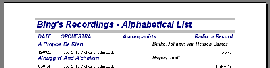
report (for printing) an example of which is shown below:
Each song is listed alphabetically alongside its writers.
All recordings of that song are catalogued underneath including the
date of recording, accompanists, orchestra, record label or radio
show. You will need a fairly good grasp of Database operation in
order to make use of the DBaseV file or comma separated file. The
files contain over 6000 entries and include almost all of the
recordings made by Bing.
Downloading the files below is not for
the faint hearted as it is quite a complex operation especially
if you do not have Microsoft Access.

The MSAccess 7.0 file [Download]
Download this file if you own a copy of Microsoft Access.
|

The DBaseV file [Download]
Download this if your software does not support Microsoft Access files or if you have an old version. The file contains the listing only.
|

The CSV file [Download]
Download this file if your software does not support either of the above formats. The file contains the listing only.
|
The Files above contain a
nearly complete list of Bing's Recordings
You'll need a copy of Microsoft Access 97 to view the .mde file
which can be downloaded as a zip above. The comma separated file
should be viewable in any almost any Database application
although the widely supported DBaseV file is preferable.
Step 1) Click on one of the links above to
download a file...
Step 2) Enter a destination to save the file to in the
dialog box (The desktop is convenient)...
Step 3) Wait for the file to download...
Step 4) Using your version of PKZip unzip the file to a
folder or the desktop...
Step 5 (For Access)) Double click the file, you can access
the main records and the reports (for printing)
Step 5 (For DBaseV)) Using whichever database application
that you have load up the file (It only stores the main
list)
Step 5 (For Comma separated)) This is a little more complex,
you'll have to follow the instructions for your software (It
also only stores the main list)
|